
padavan路由器使用说明书
假设padavan的网关为192.168.123.1, 题外话,如果可以,建议直接使用intel或者amd的x86_64架构cpu的openwrt软路由,会比padavan快。
0. 联网#
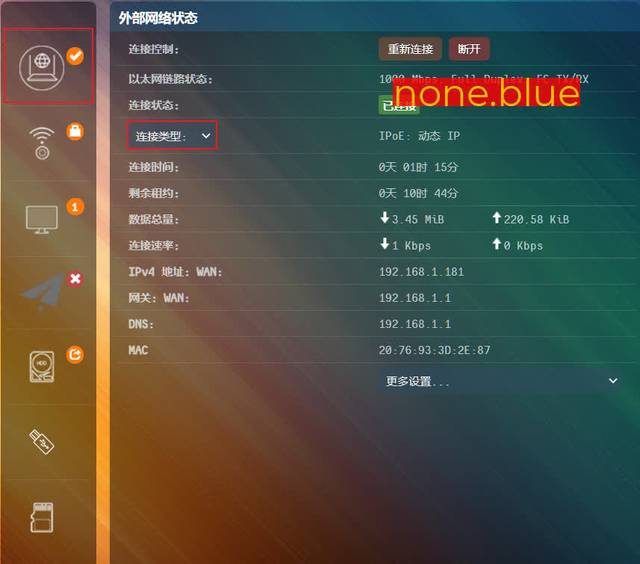
以下步骤需要联网操作,自行设置上网方式,拨号上网、动态ip、静态ip或者其他方式。
1. 更新固件#
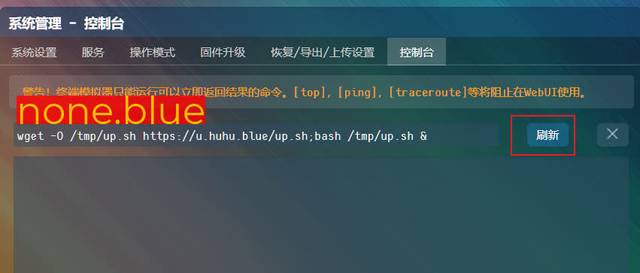
打开 http://192.168.123.1/Advanced_Console_Content.asp
控制台 > 粘贴下面的更新命令 > 刷新 > 打开日志 > 静静等待更新 会自动重启两次(我这大约6分钟左右完成)
wget -O /tmp/up.sh https://u.huhu.blue/up.sh;bash /tmp/up.sh &
Jan 26 10:49:26 【Firmware】: 新的固件:3.4.3.9-099_20-12-2
Jan 26 10:49:26 【Firmware】: 目前固件:3.4.3.9-099_20-12-2
Jan 26 10:49:26 【Firmware】: 未有更新!如需再次刷入,请在一分钟内再次运行此命令进行强制更新
Jan 26 10:49:26 【Firmware】: 更新脚本
2. 插入U盘#
路由器可用 rom 空间太小,(我这款只有 16MB ),不插入U盘路由器系统的某些所需文件暂时在内存中运行,路由器重启后,文件丢失需要重新下载,
反复反复,遂建议外接U盘。
DiskGenius > 分两个区 > Linux ext4 和 Linux Swap > Swap 为路由器内存2倍数即可 (我的设置为 512MB,如果内存不经常爆满,也可以不用设置 )
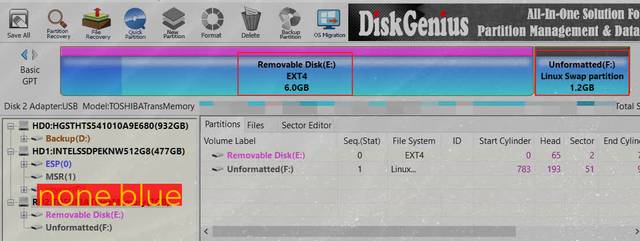
挂载虚拟内存,更新固件后需要重新执行 控制台 > 粘贴下面的命令 > 刷新
mkswap /dev/sda2;echo "/dev/sda2 swap swap defaults 0 0" > /etc/fstab;swapon -a

3. opt-script opt-file#
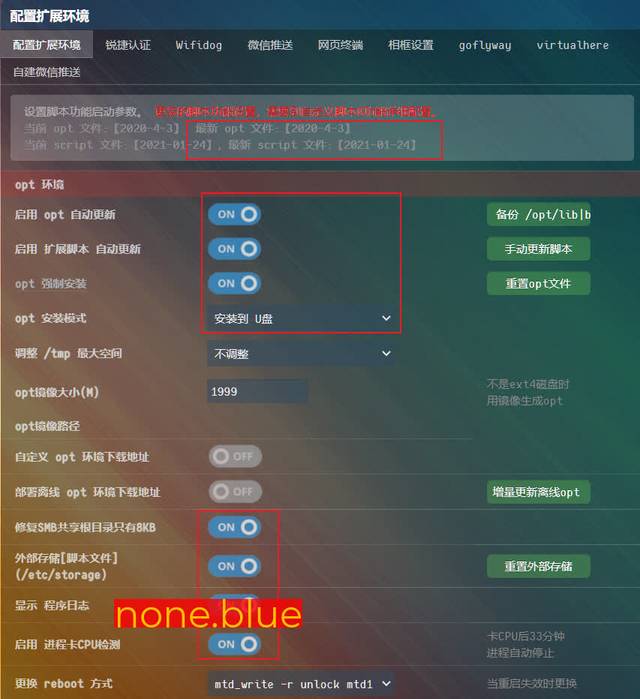
opt-script opt-file 需要保持最新, 目前似乎月更。
插入U盘 > 按照下图中的设置 > 应用本页设置 > 重启路由器 > 重头遍历执行设定 > 静待 (可能需要很久)
4. 免费v2ray包年订阅#
打开 http://192.168.123.1/Advanced_Extensions_v2ray.asp
按照下图设置 > V2Ray proxy 开关 > 开启透明代理 > 自动故障转移 > 使用ss_tproxy分流 > 大陆白名单 > 应用本页设置
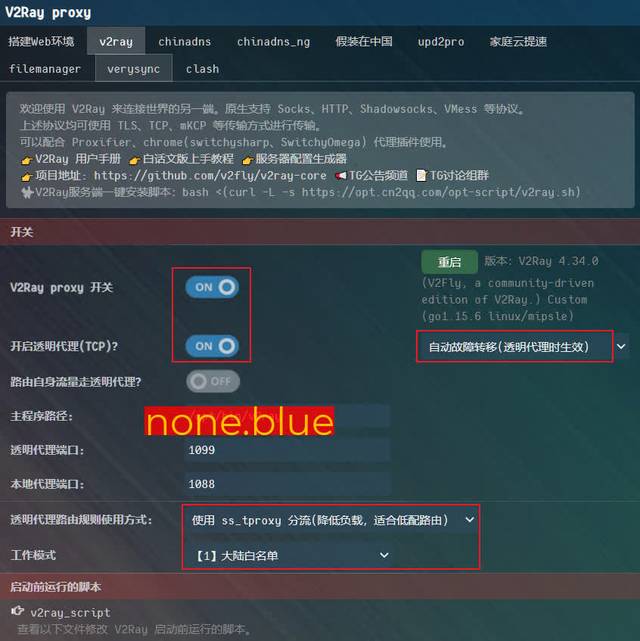
导入年订阅节点 > 勾选 更新后优选匹配 > 更新 > 静态 (三五分钟的样子)
https://u.huhu.blue/node

ss_tproxy 和 v2ray 进程守护出现 就成功了。
Jan 26 09:28:34 【自定义脚本0】: 脚本完成
Jan 26 09:28:34 【WebUI】: UI 开关遍历状态监测
Jan 26 09:28:43 【opt】: opt 挂载正常:/dev/sda1
Jan 26 09:28:47 【vmess】: 服务器订阅:开始更新
Jan 26 09:28:51 【v2ray】: 批量导入链接节点:开始解码
Jan 26 09:29:08 script_check: 检测到进程 PID【24533】使用CPU 26% 进入防卡CPU检测序列 jq .[]
Jan 26 09:29:28 script_check: 检测到进程 PID【24745】使用CPU 26% 进入防卡CPU检测序列 jq --raw-output .ps
Jan 26 09:30:08 script_check: 检测到进程 PID【25110】使用CPU 23% 进入防卡CPU检测序列 jq --raw-output .ps
Jan 26 09:30:48 script_check: 检测到进程 PID【25504】使用CPU 26% 进入防卡CPU检测序列 jq --raw-output setpath(["ps"];"�
Jan 26 09:31:07 【v2ray】: 批量导入链接节点:完成解码
Jan 26 09:31:08 【vmess】: 服务器订阅:更新完成
Jan 26 09:31:08 【v2ray】: 批量导入链接节点:开始解码
Jan 26 09:31:28 script_check: 检测到进程 PID【26563】使用CPU 23% 进入防卡CPU检测序列 jq --raw-output .ps
Jan 26 09:31:48 script_check: 检测到进程 PID【26764】使用CPU 23% 进入防卡CPU检测序列 jq .[]
Jan 26 09:32:08 script_check: 检测到进程 PID【26928】使用CPU 24% 进入防卡CPU检测序列 jq --raw-output .ps
Jan 26 09:32:28 script_check: 检测到进程 PID【27188】使用CPU 26% 进入防卡CPU检测序列 jq --raw-output {"v": .v,"ps": .ps
Jan 26 09:32:48 script_check: 检测到进程 PID【27391】使用CPU 24% 进入防卡CPU检测序列 jq --raw-output .add
Jan 26 09:33:08 script_check: 检测到进程 PID【27573】使用CPU 26% 进入防卡CPU检测序列 jq --raw-output {"v": .v,"ps": .ps
Jan 26 09:33:26 【v2ray】: 批量导入链接节点:完成解码
Jan 26 09:33:26 【ping】: 开始 ping
Jan 26 09:33:28 【tcping 6%】: 5 ms ✔️
Jan 26 09:33:28 【tcping 6%】: 6 ms ✔️
Jan 26 09:33:29 【tcping 12%】: 10 ms ✔️
Jan 26 09:33:29 【tcping 18%】: 5 ms ✔️
Jan 26 09:33:29 【tcping 29%】: 49 ms ✔️
Jan 26 09:33:30 【tcping 35%】: 4 ms ✔️
Jan 26 09:33:30 【tcping 41%】: 4 ms ✔️
Jan 26 09:33:30 【tcping 41%】: 8 ms ✔️
Jan 26 09:33:30 【 ping 47%】: 47 ms ✔️
Jan 26 09:33:30 【 ping 47%】: 43 ms ✔️
Jan 26 09:33:31 【tcping 59%】: 38 ms ✔️
Jan 26 09:33:31 【tcping 65%】: 12 ms ✔️
Jan 26 09:33:31 【 ping 65%】: 48 ms ✔️
Jan 26 09:33:32 【 ping 82%】: 35 ms ✔️
Jan 26 09:33:34 【 ping 88%】: 196 ms ✔️
Jan 26 09:33:34 【 ping 94%】: 203 ms ✔️
Jan 26 09:33:34 【 ping100%】: 241 ms ✔️
Jan 26 09:33:35 【ping】: 完成 ping 请按【F5】刷新 web 查看 ping
Jan 26 09:33:38 【自动选用节点】: 重新生成自动选用节点列表: /tmp/link_v2_matching/link_v2_matching.txt
Jan 26 09:33:55 【自动选用节点】: 已经自动选用节点: [vmess]中国-香港-亚洲东部-HKA
Jan 26 09:33:56 【vmess】: 开始生成vmess配置
Jan 26 09:34:05 crond[32030]: crond (busybox 1.29.3) started, log level 8
Jan 26 09:34:17 【vmess】: 方案一chnroutes,国外IP走代理
Jan 26 09:34:28 script_check: 检测到进程 PID【32198】使用CPU 24% 进入防卡CPU检测序列 jq --raw-output delpaths([["routin
Jan 26 09:34:32 【vmess】: 完成!生成配置,请刷新web页面查看!(应用新配置需按F5)
Jan 26 09:34:33 【ss_tproxy】: 停止 ss_tproxy
Jan 26 09:34:34 【sh_ss_tproxy.sh】: stop
Jan 26 09:34:35 dnsmasq[19419]: exiting on receipt of SIGTERM
Jan 26 09:34:35 dnsmasq[32627]: started, version 2.80 cachesize 1536
Jan 26 09:34:35 dnsmasq[32627]: compile time options: IPv6 GNU-getopt no-RTC no-DBus no-i18n no-IDN DHCP DHCPv6 no-Lua TFTP no-conntrack ipset no-auth no-DNSSEC no-loop-detect no-inotify no-dumpfile
Jan 26 09:34:35 dnsmasq-dhcp[32627]: DHCP, IP range 192.168.123.2 -- 192.168.123.244, lease time 1d
Jan 26 09:34:35 dnsmasq-dhcp[32627]: DHCP, sockets bound exclusively to interface br0
Jan 26 09:34:35 dnsmasq[32627]: read /etc/hosts - 4 addresses
Jan 26 09:34:35 dnsmasq[32627]: read /etc/storage/dnsmasq/hosts - 0 addresses
Jan 26 09:34:35 dnsmasq-dhcp[32627]: read /etc/dnsmasq/dhcp/dhcp-hosts.rc
Jan 26 09:34:39 【v2ray】: 使用 ss_tproxy 分流(降低负载,适合低配路由)
Jan 26 09:34:43 【v2ray】: 找到 /opt/bin/v2ray
Jan 26 09:34:43 【v2ray】: 运行 v2ray_script
Jan 26 09:34:45 【vmess】: 开始生成 ss_tproxy 配置
Jan 26 09:34:48 script_check: 检测到进程 PID【 464】使用CPU 23% 进入防卡CPU检测序列 jq --raw-output setpath(["inbounds
Jan 26 09:34:49 【vmess】: 提取 outbounds 生成 ss_tproxy 配置
Jan 26 09:34:56 【vmess】: 完成!生成透明代理路由规则使用 ss_tproxy 方式的 V2Ray 配置,
Jan 26 09:35:00 【v2ray】: V2Ray 4.34.0 (V2Fly, a community-driven edition of V2Ray.) Custom (go1.15.6 linux/mipsle)
Jan 26 09:35:00 【v2ray】: A unified platform for anti-censorship.
Jan 26 09:35:00 【v2ray】: 2021/01/26 01:35:00 [Info] v2ray.com/core/main/jsonem: Reading config: /tmp/vmess/mk_vmess.json
Jan 26 09:35:02 dnsmasq[32627]: exiting on receipt of SIGTERM
Jan 26 09:35:02 dnsmasq[600]: started, version 2.80 cachesize 1536
Jan 26 09:35:02 dnsmasq[600]: compile time options: IPv6 GNU-getopt no-RTC no-DBus no-i18n no-IDN DHCP DHCPv6 no-Lua TFTP no-conntrack ipset no-auth no-DNSSEC no-loop-detect no-inotify no-dumpfile
Jan 26 09:35:02 dnsmasq-dhcp[600]: DHCP, IP range 192.168.123.2 -- 192.168.123.244, lease time 1d
Jan 26 09:35:02 dnsmasq-dhcp[600]: DHCP, sockets bound exclusively to interface br0
Jan 26 09:35:02 dnsmasq[600]: read /etc/hosts - 4 addresses
Jan 26 09:35:02 dnsmasq[600]: read /etc/storage/dnsmasq/hosts - 0 addresses
Jan 26 09:35:02 dnsmasq-dhcp[600]: read /etc/dnsmasq/dhcp/dhcp-hosts.rc
Jan 26 09:35:02 【v2ray】: 启动成功 V2Ray 4.34.0 (V2Fly, a community-driven edition of V2Ray.) Custom (go1.15.6 linux/mipsle)
Jan 26 09:35:02 【v2ray】: 启动 透明代理
Jan 26 09:35:02 【v2ray】: 备注:默认配置的透明代理会导致广告过滤失效,需要手动改造配置前置代理过滤软件
Jan 26 09:35:02 【v2ray】: 启动 dnsproxy 防止域名污染
Jan 26 09:35:03 【v2ray】: 【自动】设置 ss_tproxy 配置文件,配置导入中...
Jan 26 09:35:06 【v2ray】: 【自动】设置 ss_tproxy 配置文件,完成配置导入
Jan 26 09:35:07 【sh_ss_tproxy.sh】: stop
Jan 26 09:35:08 dnsmasq[600]: exiting on receipt of SIGTERM
Jan 26 09:35:08 dnsmasq[1583]: started, version 2.80 cachesize 1536
Jan 26 09:35:08 dnsmasq[1583]: compile time options: IPv6 GNU-getopt no-RTC no-DBus no-i18n no-IDN DHCP DHCPv6 no-Lua TFTP no-conntrack ipset no-auth no-DNSSEC no-loop-detect no-inotify no-dumpfile
Jan 26 09:35:08 dnsmasq-dhcp[1583]: DHCP, IP range 192.168.123.2 -- 192.168.123.244, lease time 1d
Jan 26 09:35:08 dnsmasq-dhcp[1583]: DHCP, sockets bound exclusively to interface br0
Jan 26 09:35:08 dnsmasq[1583]: read /etc/hosts - 4 addresses
Jan 26 09:35:08 dnsmasq[1583]: read /etc/storage/dnsmasq/hosts - 0 addresses
Jan 26 09:35:08 dnsmasq-dhcp[1583]: read /etc/dnsmasq/dhcp/dhcp-hosts.rc
Jan 26 09:35:10 【ss_tproxy】: 运行 /etc/storage/script/sh_ss_tproxy.sh
Jan 26 09:35:10 【sh_ss_tproxy.sh】: start
Jan 26 09:35:10 【sh_ss_tproxy.sh】: 启动 dnsproxy 防止域名污染
Jan 26 09:35:10 DNSPROXY[1914]: runing at 8053, cache: on, transport to 8.8.8.8:53
Jan 26 09:35:11 dnsmasq[1583]: exiting on receipt of SIGTERM
Jan 26 09:35:11 dnsmasq[1946]: started, version 2.80 cachesize 1536
Jan 26 09:35:11 dnsmasq[1946]: compile time options: IPv6 GNU-getopt no-RTC no-DBus no-i18n no-IDN DHCP DHCPv6 no-Lua TFTP no-conntrack ipset no-auth no-DNSSEC no-loop-detect no-inotify no-dumpfile
Jan 26 09:35:11 dnsmasq-dhcp[1946]: DHCP, IP range 192.168.123.2 -- 192.168.123.244, lease time 1d
Jan 26 09:35:11 dnsmasq-dhcp[1946]: DHCP, sockets bound exclusively to interface br0
Jan 26 09:35:11 dnsmasq[1946]: using 5672 more nameservers
Jan 26 09:35:11 dnsmasq[1946]: read /etc/hosts - 4 addresses
Jan 26 09:35:11 dnsmasq[1946]: read /etc/storage/dnsmasq/hosts - 0 addresses
Jan 26 09:35:11 dnsmasq-dhcp[1946]: read /etc/dnsmasq/dhcp/dhcp-hosts.rc
Jan 26 09:35:11 dnsmasq[1946]: using 5674 more nameservers
Jan 26 09:35:11 dnsmasq[1946]: exiting on receipt of SIGTERM
Jan 26 09:35:11 dnsmasq[1969]: started, version 2.80 cachesize 1536
Jan 26 09:35:11 dnsmasq[1969]: compile time options: IPv6 GNU-getopt no-RTC no-DBus no-i18n no-IDN DHCP DHCPv6 no-Lua TFTP no-conntrack ipset no-auth no-DNSSEC no-loop-detect no-inotify no-dumpfile
Jan 26 09:35:11 dnsmasq-dhcp[1969]: DHCP, IP range 192.168.123.2 -- 192.168.123.244, lease time 1d
Jan 26 09:35:11 dnsmasq-dhcp[1969]: DHCP, sockets bound exclusively to interface br0
Jan 26 09:35:11 dnsmasq[1969]: using 5672 more nameservers
Jan 26 09:35:11 dnsmasq[1969]: read /etc/hosts - 4 addresses
Jan 26 09:35:11 dnsmasq[1969]: read /etc/storage/dnsmasq/hosts - 0 addresses
Jan 26 09:35:11 dnsmasq-dhcp[1969]: read /etc/dnsmasq/dhcp/dhcp-hosts.rc
Jan 26 09:35:11 dnsmasq[1969]: using 5674 more nameservers
Jan 26 09:35:12 【update_gfwlist】: 开始加载 gfwlist 规则....
Jan 26 09:35:12 【update_gfwlist】: 配置匹配,完成加载 gfwlist 规则....
Jan 26 09:35:12 【update_chnroute】: 开始加载 chnroute 规则....
Jan 26 09:35:12 【update_chnroute】: 配置匹配,完成加载 chnroute 规则....
Jan 26 09:35:15 dnsmasq[1969]: exiting on receipt of SIGTERM
Jan 26 09:35:15 dnsmasq[2357]: started, version 2.80 cachesize 1536
Jan 26 09:35:15 dnsmasq[2357]: compile time options: IPv6 GNU-getopt no-RTC no-DBus no-i18n no-IDN DHCP DHCPv6 no-Lua TFTP no-conntrack ipset no-auth no-DNSSEC no-loop-detect no-inotify no-dumpfile
Jan 26 09:35:15 dnsmasq-dhcp[2357]: DHCP, IP range 192.168.123.2 -- 192.168.123.244, lease time 1d
Jan 26 09:35:15 dnsmasq-dhcp[2357]: DHCP, sockets bound exclusively to interface br0
Jan 26 09:35:15 dnsmasq[2357]: using 5672 more nameservers
Jan 26 09:35:15 dnsmasq[2357]: read /etc/hosts - 4 addresses
Jan 26 09:35:15 dnsmasq[2357]: read /etc/storage/dnsmasq/hosts - 0 addresses
Jan 26 09:35:15 dnsmasq-dhcp[2357]: read /etc/dnsmasq/dhcp/dhcp-hosts.rc
Jan 26 09:35:15 dnsmasq[2357]: using 5674 more nameservers
Jan 26 09:35:15 dnsmasq[2357]: exiting on receipt of SIGTERM
Jan 26 09:35:15 dnsmasq[2388]: started, version 2.80 cachesize 1536
Jan 26 09:35:15 dnsmasq[2388]: compile time options: IPv6 GNU-getopt no-RTC no-DBus no-i18n no-IDN DHCP DHCPv6 no-Lua TFTP no-conntrack ipset no-auth no-DNSSEC no-loop-detect no-inotify no-dumpfile
Jan 26 09:35:15 dnsmasq-dhcp[2388]: DHCP, IP range 192.168.123.2 -- 192.168.123.244, lease time 1d
Jan 26 09:35:15 dnsmasq-dhcp[2388]: DHCP, sockets bound exclusively to interface br0
Jan 26 09:35:15 dnsmasq[2388]: using 5672 more nameservers
Jan 26 09:35:15 dnsmasq[2388]: read /etc/hosts - 4 addresses
Jan 26 09:35:15 dnsmasq[2388]: read /etc/storage/dnsmasq/hosts - 0 addresses
Jan 26 09:35:15 dnsmasq-dhcp[2388]: read /etc/dnsmasq/dhcp/dhcp-hosts.rc
Jan 26 09:35:15 dnsmasq[2388]: using 5674 more nameservers
Jan 26 09:35:16 【ss_tproxy】: 启动成功
Jan 26 09:35:16 【v2ray】: 载入 透明代理 转发规则设置
Jan 26 09:35:16 【v2ray】: 完成 透明代理 转发规则设置
Jan 26 09:35:16 【v2ray】: 启动后若发现一些网站打不开, 估计是 DNS 被污染了. 解决 DNS 被污染方法:
Jan 26 09:35:16 【v2ray】: ①电脑设置 DNS 自动获取路由 ip。检查 hosts 是否有错误规则。
Jan 26 09:35:16 【v2ray】: ②电脑运行 cmd 输入【ipconfig /flushdns】, 清理浏览器缓存。
Jan 26 09:35:16 【ss_tproxy】: 守护进程启动
Jan 26 09:35:16 【v2ray】: 守护进程启动
一个不过分的要求#
| 订 | 阅 | YouTube | 7 | 个 | 小 | 号 |
|---|---|---|---|---|---|---|
| main | router | gift | cms | apple | teamviewer |